آمیگا ۱۰۰۰؛ اولین آمیگا
ماشینی برای شکستن محدودیتهای گذشته
AMIGA 1000 ⬡ 1985
آمیگا ۱۰۰۰ در یک رونمایی بزرگ توسط کمودور در سال ۱۹۸۵ به جهانیان نشان داده شد. این کامپیوتر واقعاً ماشینی برای شکستن محدودیتهای گذشته بود. دستگاهی با گرافیک تمامرنگی که میتوانست ۴۰۹۶ رنگ را به طور همزمان نمایش دهد — با استفاده از حالت نمایش HAM — در حالی که مکینتاش اپل که سال قبل عرضه شده بود هنوز از گرافیک سیاه و سفید استفاده میکرد. آمیگا صدای استریو داشت؛ اکثر ماشینهای دیگر در بهترین حالت خروجی صدای مونو داشتند. این کامپیوتر مدرن و متفاوت، یک سیستم عامل مولتیتسکینگ داشت. آمیگا انقلابی بود که آینده را پیشبینی کرد.
توضیح اینکه این دستگاه در زمان عرضه چقدر انقلابی بود برای مردم عادی دشوار است — و در واقع کمودور هم تلاش کرد بفهمد چطور باید این دستگاه را تبلیغ کند، اما متأسفانه در این کار موفق نبود.

این تصویر اولین مدل آمیگا ۱۰۰۰ است. تراشههای سفارشی که قلب تپنده دستگاه بودند با نام OCS — مجموعه چیپ اصلی — معرفی شدند. تراشه اگنس را در مقاله اختصاصی آمیگااستور بررسی کنید.
کیکاستارت و ورکبنچ
به دلیل عجله برای عرضه آمیگای جدید، هسته سیستم عامل آمیگا — Kickstart — روی یک فلاپی دیسک ۳/۵ اینچی قرار داشت که هر بار باید دستگاه روشن میشد دیسک درون درایو گذاشته میشد. سپس Kickstart در ناحیه خاصی از حافظه بارگذاری میشد، نوشتن در آن محل حافظه غیرفعال میشد و سیستم مجدداً راهاندازی میگردید. در این مرحله آمیگای جدید آماده بارگیری نرمافزارهایی مثل میز کار آمیگا — دسکتاپ — بازی یا هر برنامه دیگری بود که کاربر میخواست استفاده کند.
این روش تا حدی دست و پا گیر بود، اما مزیتی که داشت این بود که نسخههای جدیدتر Kickstart به راحتی توزیع میشدند. متخصصان نرمافزار میتوانستند به کار روی Kickstart ادامه دهند، ویژگیهای جدید اضافه کنند و مشکلات پیدا شده را برطرف کنند. نسخه جدید به سادگی از دیسک به حافظه آمیگا منتقل میشد — بدون اینکه کاربر مجبور باشد دستگاه را باز کند.
راههایی برای ترکیب محتوای دیسک کیکاستارت و ورکبنچ وجود داشت تا برای بارگذاری ورکبنچ نیازی به تعویض دیسک نباشد. کیکاستارت ۲۵۶ کیلوبایت از فضای دیسک ۸۸۰ کیلوبایتی آمیگا را اشغال میکرد، بنابراین ۶۲۴ کیلوبایت روی فلاپی دیسک آزاد میماند. نسخههای اولیه Workbench 1 هم نسبتاً کوچک و کم حجم بودند — در نتیجه کیکاستارت و ورکبنچ به راحتی روی یک دیسک جا میشدند. راهنمای ورکبنچ ۱/۳ را در مقاله اختصاصی آمیگااستور بخوانید.
مدلهای تولیدی اولیه آمیگا با تجدید نظر در تراشه نمایشگر DENISE عرضه شدند که توان نمایش حالت ویژه ۶۴ رنگی آمیگا — EHB — را نداشت. دارای ۳۲ رنگ بود که میتوانست از پالت ۴۰۹۶ رنگ انتخاب شود، اما پس از آن کپیهایی از آن ۳۲ رنگ سایهمانند از رنگهای اصلی به وجود میآمد که تا نیمه روشن بودند.

واحد پایه آمیگا
آمیگا یک سیستم بسته مثل مکینتاش اپل نداشت. در این کامپیوتر یک سوکت برای افزایش رم در نظر گرفته شده بود و همچنین یک کانکتور گسترش همه منظوره. این دستگاه اولین عضو کمودور از خط آمیگا بود که با قیمت ۱۲۹۵ دلار با واحد پایه، صفحه کلید و ماوس عرضه شد. واحد پایه شامل ۲۵۶ کیلوبایت رم و ۸۸۰ کیلوبایت فلاپی درایو بود. این سیستم ابتدا با نام انحصاری «آمیگا» عرضه میشد، اما کمودور پس از عرضه آمیگا ۵۰۰ در سال ۱۹۸۷ نام دستگاه اولیه را به آمیگا ۱۰۰۰ تغییر داد. تاریخچه آمیگا ۵۰۰ را در مقاله اختصاصی بخوانید.
سری کامپیوترهای آمیگا یک سیستم عامل گرافیکی چندوظیفهای ۳۲ بیتی معروف به AmigaOS را اجرا میکردند. AmigaOS همچنین شامل یک پوسته فرمان به نام AmigaDOS برای ورود دستورات مبتنی بر صفحه کلید بود — که قدرتمندتر از رابط گرافیکی عمل میکرد.
آمیگا با دو پورت کاربری عرضه شد که میتوانست ماوس، جویاستیک یا سایر دستگاههای اشارهگر را بپذیرد. در سمت راست آنها، تنها ابزار رسمی توسعه آمیگا دیده میشد: یک شیار گسترش که به لوازم جانبی پیچیدهای مانند ارتقای رم جانبی، کنترلکنندههای SCSI و امولاتور IBM اجازه دسترسی میداد.

پورتهای ورودی/خروجی
صفحهکلید جداشدنی و خوشطراحی آمیگا در زمانی که استفاده نمیشد زیر دستگاه قرار میگرفت و از طریق کابل تلفنمانند به سوکت وصل میشد. مثل بسیاری از ماشینهای آن زمان، پورتهای موازی و سریال استاندارد برای اتصال چاپگرها، مودمها و دستگاههای مختلف دیگر هم به آن اضافه شده بود. اما بر خلاف هر دستگاه دیگری، این پورتها پینهای معکوس داشتند — پورت سریال DB25 به جای خار سوراخ داشت و پورت موازی DB25 به جای سوراخ خاردار بود. به همین دلیل خیلی مهم بود هنگام اتصال لوازم جانبی به این کانکتورها دقت زیادی به کار گرفته شود، چون در صورت اتصال به پورت اشتباه ممکن بود به قطعات الکترونیکی آسیب برساند. نگهداری سخت افزار را در مقاله اختصاصی آمیگااستور بخوانید.
این دستگاه مانند سایر ماشینهای بعدی آمیگا تغییراتی به دنبال داشت. همچنین آمیگا ۱۰۰۰ یک رابط برای اتصال حداکثر ۳ درایو فلاپی دیسک خارجی داشت.
صوتی و تصویری
اینجا میتوانید پورتهایی را ببینید که آمیگا را به یک نیروگاه چندرسانهای تبدیل کرده بودند: خروجیهای صدای استریو و سه کانکتور مجزای خروجی ویدیو که کیفیت نمایشگر را از راست به چپ افزایش میدادند. در حالی که خط آتاری ST به لطف پورتهای MIDI جایگاهش را در زمینه صدا پیدا کرد، آمیگا در تولید ویدیوی زنده تخصص داشت.
با شناخت قابلیتهای گرافیکی آمیگا، استودیوهای تلویزیونی متعددی از آمیگا و جانشینانش برای تولید نقشههای هواشناسی روی آنتن زنده، آرمهای ایستگاه، زیرنویسها و سایر متنهای روی صفحه برای پخش اخبار زنده استفاده کردند — تا اواخر دهه ۱۹۹۰ و تقریباً تا سال ۲۰۰۰.

باز کردن درب
حالا وقت جدا کردن این قسمت است. پس از باز کردن چند پیچ در بخش پایین، درب برداشته میشود و محافظ فلزی RF باید کنار گذاشته شود. اولین نمای داخل شاسی دیده میشود: یک منبع تغذیه بلند و آجری در سمت چپ کیس و درایو فلاپی در سمت راست. و بعد — چیزهای سبز! همان جایی که همه اتفاقات میافتد.

تیمی که آمیگا را طراحی کرد، مثل سازندگان مکینتاش اصلی، قالبی را که برای ریختهگری نیمه بالایی قاب پلاستیکی استفاده میشد امضا کردند. در نتیجه نام همه افراد درگیر به طور دائمی در هر آمیگا ۱۰۰۰ نقش بسته است. برجستهترین امضا مربوط به جی ماینر — پدر آمیگا — و اثر پنجه سگش میچی است.
کمودور آمیگا را طوری طراحی کرد که یک ماژول رم ۲۵۶ کیلوبایتی نصبشده توسط کاربر را بپذیرد تا حافظه سیستم را به ۵۱۲ کیلوبایت افزایش دهد. آن را به جلوی کامپیوتر زیر یک پنل پلاستیکی قابل جابجایی وصل کرد. با افزودنیهای شخصی دیگر — معمولاً متصل به گذرگاه توسعه خارجی — کاربر میتوانست رم آمیگا را تا ۸ مگابایت افزایش دهد.
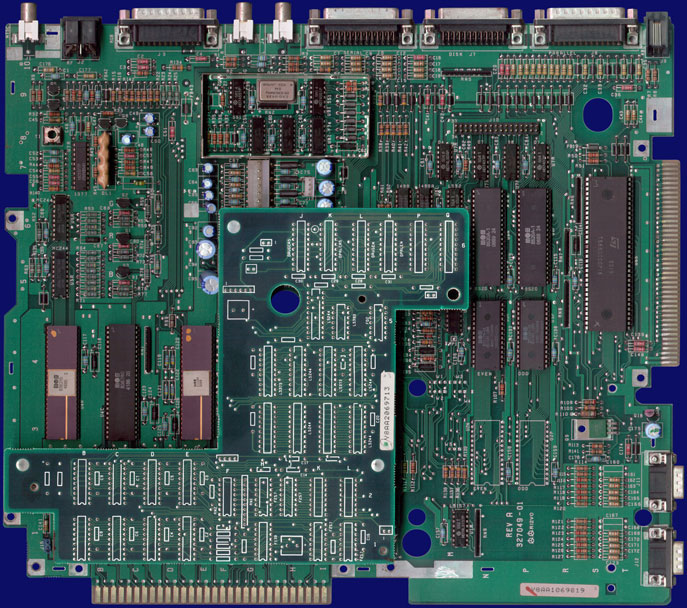
فروشگاه کنترل قابل نوشتن
هنگامی که زمان عرضه آمیگا در سال ۱۹۸۵ فرا رسید، مهندسان کمودور فهمیدند سیستم عامل آنقدر باگ دارد که نمیتوان آن را روی تراشههای ROM داخلی کامپیوتر قرار داد — و این خیلی بد بود، چون قرار گرفتن سیستم عامل روی تراشه به آمیگا امکان میداد درست مثل سایر کامپیوترهای شخصی اولیه فوراً بوت شود.
در عوض، مهندسان راهحلی به نام «فروشگاه کنترل قابل نوشتن» — WCS — ابداع کردند که روی یک بورد دختر از طریق هدرهای چند پینی بلند — جایی که تراشهها معمولاً قرار میگیرند — به مادربرد وصل میشد. WCS شامل ۲۵۶ کیلوبایت حافظه بود که به طور خاص برای نگهداری سیستم عامل اصلی استفاده میشد — سیستمی که باید از فلاپی دیسک در زمان بوت بارگذاری میشد.
فلاپی درایو
آمیگا ۱۰۰۰ با یک دیسک درایو عرضه شد که میتوانست ۸۸۰ کیلوبایت در هر دیسک ۳/۵ اینچی ذخیره کند — ظرفیتی چشمگیر برای سال ۱۹۸۵. در آن زمان اکثر فلاپی درایوهای کامپیوتر IBM حدود ۳۶۰ کیلوبایت روی دیسکهای ۵/۲۵ اینچی ذخیره میکردند، در حالی که فلاپیهای مکینتاش ۴۰۰ کیلوبایت نگه میداشتند.

پردازنده و تراشههای سفارشی
در یک طرف مادربرد، پردازنده ۱۶/۳۲ بیتی موتورولا ۶۸۰۰۰ آمیگا قرار داشت که با سرعت نسبتاً سریع ۸ مگاهرتز کار میکرد. در سمت چپ آن یک جفت تراشه MOS 8520 CIA قرار داشت که ارتباطات سریال و موازی کامپیوتر را مدیریت میکرد. زیر آن رامهای بوت استرپ آمیگا بودند که حاوی سیستم عاملی بودند که به کامپیوتر میگفت چطور یک سیستم عامل کامل را از فلاپی دیسک بارگذاری کند.
قدرت مخفی آمیگا در چیپست پردازشی سفارشیاش بود — سه تراشه با نامهای دخترانه: «Paula» صدای کامپیوتر را تولید میکرد و همچنین درایو فلاپی را کنترل میکرد. «Agnus» جادوی مدیریت حافظه و چند عملکرد گرافیکی کمکی را انجام میداد. «Daphne» — نسخه اولیه تراشه مطرحتری به نام «Denise» — بیشتر خروجی گرافیکی چشمگیر آمیگا ۱۰۰۰ را تولید میکرد.
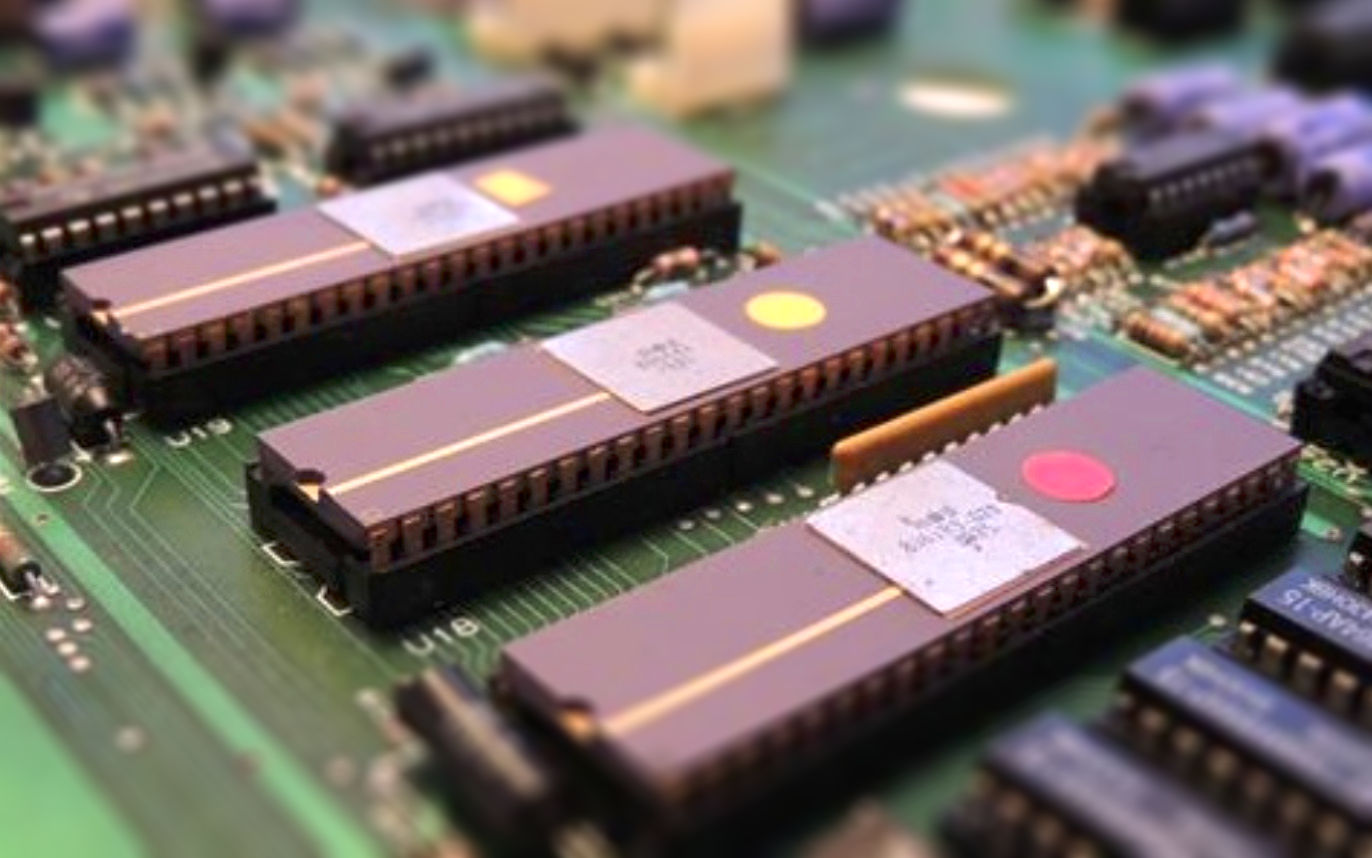
این تراشهها در کنار هم قلب و روح یک کامپیوتر قدرتمند را تشکیل میدادند — کامپیوتری که با سرعت از کلونهای IBM در بازار پیشی گرفت و بسیار جلوتر از زمان خود بود.
شبیهساز IBM
آمیگا از طرف روزنامهنگاران و تحلیلگران صنعت به عنوان مبتکرترین ماشین معرفیشده در آن سالها شناخته میشد، اما مثل تمام کامپیوترهای جدیدی که از فناوری گذشته خارج میشوند، ممکن بود یک سال یا بیشتر طول بکشد تا آمیگا یک کتابخانه نرمافزاری گسترده جمعآوری کند.
اما به نظر میرسید کمودور این مشکل را با یک جادو حل کرده است. در ۲۳ ژوئیه، وقتی آمیگا را رسماً در یک رویداد رسانهای در مرکز لینکلن نیویورک رونمایی کردند، کمودور اعلام کرد گزینهای باعث میشود آمیگا با کامپیوتر شخصی محبوب IBM و پایگاه عظیمش سازگار باشد. روش دستیابی به این سازگاری شگفتانگیز واقعی بود: آمیگا کامپیوتر شخصی IBM را به طور کامل در نرمافزار شبیهسازی میکرد.

به عبارت دیگر برای تقلید از IBM نیازی به اضافه کردن برد توسعه حاوی پردازنده ۸۰۸۸ و تراشههای پشتیبانی نبود. کاربران آمیگا به سادگی یک برنامه شبیهسازی را بارگذاری میکردند که سیستم عامل اختصاصی آمیگا را با PC-DOS جایگزین میکرد تا آمیگا مثل یک IBM عمل کند. این در نیویورک نشان داده شد: یک مهندس شبیهساز را از یک دیسک ۳/۵ اینچی بارگذاری کرد، سپس PC-DOS را از یک دیسک استاندارد IBM ۵/۲۵ اینچی روی یک درایو خارجی بوت کرد. سیستم عامل گرافیکمحور آمیگا ناپدید شد و صفحه پیام معمول راهاندازی PC-DOS ظاهر شد:
IBM Personal Computer DOS
Version 2.10 (C)Copyright IBM Corp 1981, 1982, 1983
A>
پس از قرار دادن دیسک ۵/۲۵ اینچی دیگر و تایپ کردن «لوتوس» در اعلان DOS، صفحه گسترده Lotus 1-2-3 نشان داده شد. صفحه نمایش آمیگا دقیقاً شبیه یک صفحه نمایش تکرنگ IBM بود. این شاهکار فنی — شبیهسازی کامل IBM در نرمافزار — توسط برنامهنویسان و مهندسان پیشرفته به بهترین وجه مورد استقبال قرار گرفت. تقریباً غیرقابل باور به نظر میرسید و حتی برخی از شاهدان نمایش تردید داشتند که آمیگا بتواند IBM را با سرعتی قابل مقایسه با IBM واقعی تقلید کند.
با این وجود، مهندسان کمودور معتقد بودند کار انجام شده و شبیهساز IBM ظرف یک ماه پس از عرضه آمیگا در سپتامبر در دسترس خواهد بود. هیچ قیمتی اعلام نشد، اما کمودور اعلام کرد روش تقلید نرمافزاری را برای کاهش هزینهها انتخاب کرده است. تنها سختافزار درگیر درایو ۵/۲۵ اینچی جانبی بود — و حتی آن هم ممکن بود غیر ضروری باشد، چون برخی برنامههای IBM را میشد از دیسکهای ۳/۵ اینچی که برای Data General One فروخته میشد بارگیری کرد.
این شبیهساز حافظه زیادی نمیخواست. بدون احتساب حافظه ویدئویی، حدود ۴۰ کیلوبایت از رم را مصرف میکرد. با این حال برای اجرای برنامههای بزرگ مثل Lotus 1-2-3، کمودور احتمالاً به کاربران توصیه میکرد رم استاندارد ۲۵۶ کیلوبایتی را به ۵۱۲ کیلوبایت — گزینه ۲۰۰ دلاری — افزایش دهند. سایدکار جعبه فلزی بود که آمیگا را به IBM پیوند زد.
تصمیم نهایی درباره حافظه
سورپرایز دیگری که در ۲۳ جولای فاش شد، پیکربندی حافظه آمیگا بود. کمودور ابتدا قصد داشت سیستم عامل بزرگ آمیگا — Intuition — را در ۱۹۲ کیلوبایت رام قرار دهد. سپس برای آسانتر کردن رفع اشکالها و عرضه به موقع، اعلام کرد اولین آمیگا Intuition را از روی دیسک بارگیری میکند و تقریباً نیمی از ۲۵۶ کیلوبایت رم کاربر را مصرف میکند.
حالا کمودور راهحل بهتری داشت: آمیگای استاندارد ۵۱۲ کیلوبایت رم خواهد داشت، اما نیمی از آن به ذخیرهسازی Intuition اختصاص دارد. این بانک اضافی با ۲۵۶ کیلوبایت رم که Writeable Control Store نام دارد، بلافاصله پس از بارگیری سیستم عامل از نوشتن محافظت میشد. حتی ریست کردن سیستم هم با آن تداخلی نداشت. در واقع Writeable Control Store مثل ۲۵۶ کیلوبایت ROM عمل میکرد — با این تفاوت که Intuition باید پس از خاموش شدن کامپیوتر دوباره از روی دیسک بارگذاری میشد. در نتیجه کل ۲۵۶ کیلوبایت رم برای برنامهها در دسترس بود.
اما Writeable Control Store به عنوان رم سیستم محاسبه نمیشد. آمیگای استاندارد ۱۲۹۵ دلاری همچنان به عنوان یک کامپیوتر ۲۵۶ کیلوبایتی معرفی میشد، حتی اگر واقعاً ۵۱۲ کیلوبایت حافظه داشت. بعداً وقتی کمودور مطمئن شد Intuition کاملاً بهینه شده — اجزای حیاتی از C کامپایل شده به زبان ماشین بازنویسی میشوند — فروشگاه Writeable Control حذف و با ROM تراشهای جایگزین میشد. این تغییر به راهاندازی تقریباً فوری سیستم دسترسی میداد، چون Intuition دیگر نیازی به بارگیری از دیسک نداشت.
«آمیگا کامپیوتری بود که آینده را پیش از موعد به خانهها آورد.»
#آمیگا۱۰۰۰ #Amiga1000 #کمودور #Commodore #پائولا #Paula #دنیس #Denise #اگنس #Agnus #کیک_استارت #Kickstart #ورک_بنچ #Workbench #هام #HAM #OCS #WCS #Intuition #موتورولا۶۸۰۰۰ #Motorola68000 #شبیه_ساز_IBM #IBM_Emulator #PC_DOS #Lotus_123 #مولتی_تسکینگ #Multitasking #گرافیک_رنگی #ColorGraphics #صدای_استریو #StereoAudio #رتروکامپیوتر #RetroComputing #نوستالژی #Nostalgia #کامپیوترهای_شگفت_انگیز #AmazingComputers #تاریخ_فناوری #TechHistory #کامپیوتر_تاریخ #ComputerHistory #چندرسانه_ای #Multimedia #دهه_هشتاد #1980s #مکینتاش #Macintosh #IBM #آمیگا #Amiga #سخت_افزار #Hardware #جی_ماینر #JayMiner #سایدکار #Sidecar #رتروگیمینگ #RetroGaming
Amiga 1000; The First Amiga
A Machine Built to Break the Limits of the Past
AMIGA 1000 ⬡ 1985
The Amiga 1000 was unveiled to the world by Commodore in a grand launch in 1985. This computer truly was a machine for breaking past limitations. A device with full-color graphics that could display 4096 colors simultaneously — using HAM display mode — while the Apple Macintosh released a year earlier still used black-and-white graphics. The Amiga had stereo sound; most other machines at best had mono output. This modern and different computer had a multitasking operating system. The Amiga was a revolution that predicted the future.
It is difficult to explain to ordinary people how revolutionary this device was at launch — and indeed, Commodore struggled to figure out how to advertise it, but unfortunately they did not succeed.
This image shows the first Amiga 1000 model. The custom chips that were the beating heart of the machine were introduced as OCS — the Original Chip Set. Read about the Agnus chip in the exclusive AmigaStore article.
Kickstart and Workbench
Due to the rush to bring the new Amiga to enthusiasts, the core of the Amiga operating system — Kickstart — was on a 3.5-inch floppy disk that had to be inserted every time the machine was powered on. Kickstart would then load into a special area of memory, writing to that memory location would be disabled, and the system would restart. At that point, the new Amiga was ready to load software like the Amiga desktop, games, or any other software the user wanted to use.
This method was somewhat cumbersome, but the advantage was that newer Kickstart versions could be easily distributed. Software experts could continue working on Kickstart, add new features, and fix problems they found. Then a new Kickstart version would be released, and ordinary users didn't have to open their machines to use it. The new version was simply transferred from disk to Amiga memory.
There were ways to combine Kickstart and Workbench disk contents so no disk swap was needed to load Workbench. Kickstart occupied 256KB of the Amiga's 880KB disk space, leaving 624KB free on the floppy. Early Workbench 1 versions were relatively small, so Kickstart and Workbench could easily fit on one disk. Read the Workbench 1.3 guide in the exclusive AmigaStore article.
Early production Amigas shipped with a revised DENISE display chip that could not display the Amiga's special 64-color EHB mode. It had 32 colors selectable from the 4096-color palette, but then shadow-like copies of those 32 colors would be created at half brightness.
The Amiga Base Unit
The Amiga did not have a closed system like the Apple Macintosh. It included a socket for RAM expansion and a general-purpose expansion connector. This was the first member of Commodore's Amiga line, priced at $1,295 with base unit, keyboard, and mouse. The base unit included 256KB of RAM and an 880KB floppy drive. The system was initially sold under the exclusive name "Amiga," but Commodore renamed the original machine to Amiga 1000 after the Amiga 500 launched in 1987. Read about the Amiga 500 history in the exclusive article.
The Amiga series ran a 32-bit graphical multitasking operating system known as AmigaOS. AmigaOS also included a command shell called AmigaDOS for keyboard-based commands — more powerful than the graphical interface.
The Amiga shipped with two user ports that could accept a mouse, joystick, or other pointing devices. To the right was the only official Amiga development tool: an expansion slot that allowed complex peripherals like external RAM upgrades, SCSI controllers, and IBM emulators.
Input/Output Ports
The detachable, well-designed Amiga keyboard stored under the machine when not in use and connected via a telephone-like cable to its socket. Like many machines of the time, standard parallel and serial ports were added for printers, modems, and various other devices. But unlike any other device, these ports had reversed pins — the DB25 serial port had holes instead of pins, and the DB25 parallel port had pins instead of holes. Therefore, great care was needed when connecting peripherals to these connectors, as wrong-port connection could damage electronic components. Read about hardware maintenance in the exclusive AmigaStore article.
This machine led to changes like later Amiga models. The Amiga 1000 also had an interface for connecting up to 3 external floppy disk drives.
Audio and Video
Here you can see the ports that turned the Amiga into a multimedia powerhouse: stereo audio outputs and three separate video output connectors with display quality increasing from right to left. While the Atari ST line found its place in audio thanks to MIDI ports, the Amiga specialized in live video production.
Recognizing the Amiga's graphics capabilities, numerous TV studios used Amigas and their successors for on-air weather maps, station logos, subtitles, and other on-screen text for live news broadcasts — until the late 1990s and nearly the year 2000.
Opening the Case
Now it's time to remove this part. After unscrewing a few screws at the bottom, the lid lifts off and the RF metal shield must be set aside. The first view inside the chassis appears: a tall brick-like power supply on the left side of the case and the floppy drive on the right. And then — the green stuff! That's where all the action happens.
The team that designed the Amiga, like the original Macintosh builders, signed the mold used to cast the upper half of the computer's plastic case. As a result, the names of everyone involved are permanently embossed in every Amiga 1000. The most prominent signature belongs to Jay Miner — father of the Amiga — and his dog Mitchie's paw print.
Commodore designed the Amiga to accept a user-installed 256KB RAM module shown here, increasing system memory to 512KB. It plugged into the front of the computer under a removable plastic panel. With other personal additions — usually connected to the external expansion bus shown earlier — the user could expand Amiga RAM up to 8 megabytes.
Writable Control Store
When the time came to release the Amiga in 1985, Commodore engineers realized the operating system was too buggy to place on internal ROM chips. (This was unfortunate, because having the OS on chip would have let the Amiga boot instantly like other early personal computers.) Instead, engineers devised a solution called the Writable Control Store — WCS — on a daughterboard connected to the motherboard via long multi-pin headers where chips normally reside. WCS contained 256KB of memory used specifically to hold the main operating system that had to be loaded from floppy at boot time.
Floppy Drive
The Amiga 1000 shipped with a disk drive that could store 880KB per 3.5-inch disk — impressive capacity for 1985. At the time, most IBM PC floppy drives stored 360KB on 5.25-inch disks, while Macintosh floppies held 400KB.
Processor and Custom Chips
On one side of the motherboard sat the Amiga's 16/32-bit Motorola 68000 processor running at a relatively fast 8 MHz. To its left was a pair of MOS 8520 CIA chips managing the computer's serial and parallel communications. Below that were the Amiga's bootstrap ROMs containing the system that tells the computer how to load a full operating system from floppy disk.
The Amiga's secret power lay in its custom processing chipset — three chips with feminine names: "Paula" produced the computer's sound and also controlled the floppy drive. "Agnus" performed memory management magic and several auxiliary graphics functions. "Daphne" — an early version of a more prominent chip called "Denise" — produced most of the Amiga 1000's impressive graphics output.
Together these chips formed the heart and soul of a powerful computer — one that quickly outpaced IBM PC clones in the market and was far ahead of its time.
The IBM Emulator
The Amiga was recognized by journalists and industry analysts as the most innovative machine introduced in those years, but like all new computers emerging from past technology, it might take a year or more to build a broad software library.
But Commodore seemed to have solved this problem with magic. On July 23rd, when officially unveiling the Amiga before hundreds at a media event at Lincoln Center in New York, Commodore announced an option making the Amiga compatible with the popular IBM PC and its massive base. The method was truly remarkable: the Amiga completely emulated the IBM PC in software.
In other words, no expansion board with an 8088 processor and support chips was needed to imitate IBM. Instead, Amiga users simply loaded an emulation program replacing the Amiga's proprietary OS with PC-DOS so the Amiga acted like an IBM. This was demonstrated in New York: an engineer loaded the PC emulator from a 3.5-inch disk, then booted PC-DOS from a standard 5.25-inch IBM disk on an external drive. The graphics-oriented Amiga OS disappeared and the usual PC-DOS startup message appeared:
IBM Personal Computer DOS
Version 2.10 (C)Copyright IBM Corp 1981, 1982, 1983
A>
After inserting another 5.25-inch disk and typing "Lotus" at the DOS prompt, the Lotus 1-2-3 spreadsheet appeared. The Amiga display looked exactly like a monochrome IBM display. This technical feat — complete IBM PC emulation in software — was best appreciated by advanced programmers and engineers. It seemed almost unbelievable, and even some witnesses doubted the Amiga could emulate IBM at a speed comparable to a real IBM.
Nevertheless, Commodore engineers believed the work was done and the IBM PC emulator would be available within a month of the Amiga's September launch. No price was announced, but Commodore stated they chose the software emulation method to reduce costs. The only hardware involved was the optional 5.25-inch external drive — and even that might be unnecessary, since some PC programs could be loaded from 3.5-inch disks sold for the Data General One.
The emulator did not require much memory. Excluding video memory, it consumed about 40KB of RAM. However, to run large programs like Lotus 1-2-3, Commodore would likely recommend users expand the standard 256KB Amiga RAM to 512KB — a $200 option. The Sidecar was the metal box that connected the Amiga to IBM.
The Final Memory Decision
Another surprise revealed on July 23rd was the Amiga's memory configuration. Commodore had initially planned to place the large Amiga operating system — Intuition — in 192KB of ROM. Then, to ease debugging and release on time, Commodore announced the first Amiga would load Intuition from disk, consuming nearly half of the user's 256KB RAM.
Now Commodore had a better solution: the standard Amiga would have 512KB RAM, but half would be dedicated to storing Intuition. This additional bank with 256KB of RAM called Writable Control Store would be write-protected immediately after the OS loaded. Even a system reset would not interfere with it. In effect, Writable Control Store acted like 256KB of ROM — except Intuition had to be reloaded from disk after powering off. As a result, the full 256KB of RAM was available for programs.
But Writable Control Store would not count as system RAM. The $1,295 standard Amiga would still be marketed as a 256KB computer, even though it actually contained 512KB of memory. Later, once Commodore was confident Intuition was fully optimized — critical components rewritten from C to machine language — the Writable Control Store would be removed and replaced with ROM chips. This change would enable near-instant booting, since Intuition would no longer need to load from disk.
"The Amiga was the computer that brought the future home ahead of time."
▚ Sources and Related Links
#Amiga1000 #Commodore #Paula #Denise #Agnus #Kickstart #Workbench #HAM #OCS #WCS #Intuition #Motorola68000 #IBM_Emulator #PC_DOS #Lotus_123 #Multitasking #ColorGraphics #StereoAudio #RetroComputing #Nostalgia #AmazingComputers #TechHistory #ComputerHistory #Multimedia #1980s #Macintosh #IBM #Amiga #Hardware #JayMiner #Sidecar #RetroGaming #VintageComputing