نگهداری سختافزارهای رترو
نگهداری از سختافزارهای رتروکامپیوتر هم علم است و هم هنر. این ماشینها که اکنون سه تا چهار دهه عمر دارند، از قطعاتی ساخته شدهاند که هرگز برای چنین طول عمری طراحی نشده بودند. مراقبت صحیح میتواند عمر عملیاتی آنها را سالها افزایش دهد، در حالی که بیتوجهی میتواند در عرض چند ماه به آسیبهای جبرانناپذیر منجر شود.
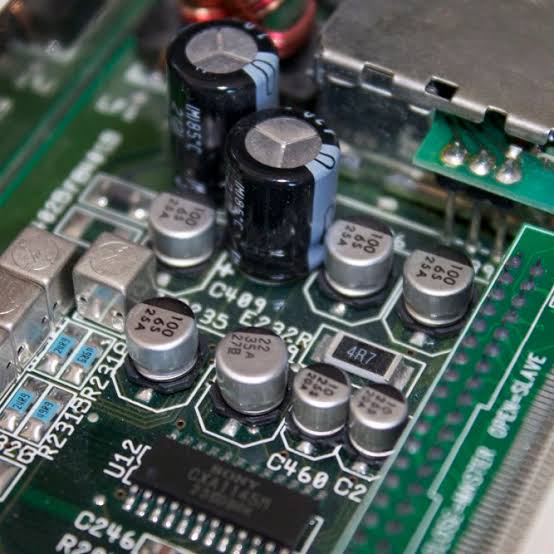
حیاتیترین اقدام نگهداری برای هر رایانه قدیمی، تعویض خازنهای الکترولیتی است. این قطعات عمر محدودی دارند، معمولاً بین ۱۰ تا ۲۰ سال، و وقتی خراب میشوند، میتوانند الکترولیت خورنده را روی برد مدار نشت دهند، مسیرهای مسی را از بین ببرند و به قطعات مجاور آسیب بزنند. نشانههای خرابی خازن شامل برآمدگی در قسمت فوقانی، نشت در پایه، ولتاژهای ناپایدار، صدای اعوجاجدار و تداخل تصویری است.
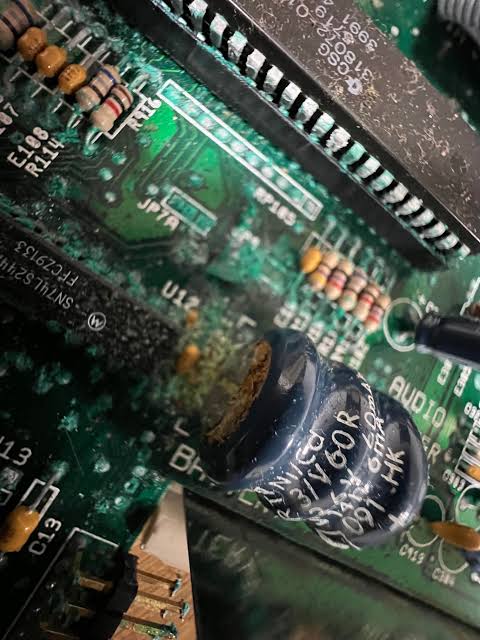
فراتر از خازنها، نقاط خرابی رایج شامل خمیر حرارتی خشکشده روی پردازندهها، سوکتهای اکسیدشده که اتصالات متناوب ایجاد میکنند، و ماژولهای ساعت بیدرنگ باطریخورده میشود. باطریهای استوانهای موجود در توسعهدهندههای حافظه آمیگا ۵۰۰ به نشت و تخریب مدارهای اطراف معروف هستند. اگر دستگاه شما هنوز باطری استوانهای اصلی دارد، خارج کردن فوری آن و تمیز کردن منطقه آسیبدیده با سرکه سفید و سپس الکل ایزوپروپیل به شدت توصیه میشود.
نگهداری از کانکتورها و سوکتها به همان اندازه مهم است. تمیزکاری ملایم با الکل ایزوپروپیل با غلظت ۹۰٪ یا بالاتر و یک برس نرم میتواند بسیاری از خطاهای اتصال متناوب را برطرف کند. برای کنتاکتهای به شدت کدر شده، پاککن مداد میتواند معجزه کند — اما ملایم باشید. هرگز از مواد ساینده روی کنتاکتهای طلاکوب استفاده نکنید.
عوامل محیطی نقش مهمی در طول عمر سختافزار دارند. رطوبت دشمن قطعات الکترونیکی قدیمی است و خوردگی را تسریع میکند. تجهیزات خود را در محیط خشک، ترجیحاً زیر ۶۰٪ رطوبت نسبی نگهداری کنید. نور مستقیم خورشید باعث زردی و شکنندگی پلاستیک میشود.
ملاحظات منبع تغذیه اغلب نادیده گرفته میشوند. منابع تغذیه اصلی دهه ۱۹۸۰ اکنون دههها از عمر طراحیشان گذشته است. ولتاژ خروجی آنها ممکن است نوسان کند و خرابی فاجعهبار میتواند ولتاژهای آسیبرسان به رایانه بفرستد. هرگز به یک منبع تغذیه ۳۵ ساله برای محافظت از سختافزار غیرقابل جایگزین خود اعتماد نکنید.
استفاده منظم در واقع برای رایانههای قدیمی مفید است. قطعاتی که برای مدت طولانی بدون استفاده میمانند ممکن است دچار مشکل شوند. روشن کردن دورهای دستگاهها، حتی فقط هر چند ماه یکبار، به حفظ آنها در وضعیت کاری کمک میکند. اجازه دهید به درستی گرم شوند و حداقل ۱۵ تا ۳۰ دقیقه کار کنند.
در نهایت، مستندسازی یک ابزار نگهداری ارزشمند است. سوابق نگهداری انجامشده، زمان تعویض خازنها، و تغییرات اعمالشده را ثبت کنید. قبل و بعد از هر کاری از داخل دستگاه عکس بگیرید — این تصاویر میتوانند برای تعمیرات آینده فوقالعاده مفید باشند.
به یاد داشته باشید، هر رایانه قدیمی که در وضعیت سالم حفظ میشود، قطعهای از تاریخ محاسبات است که زنده نگه داشته شده. مراقبتی که امروز از آنها میکنیم تعیین میکند که آیا نسلهای آینده میتوانند این ماشینهای قابل توجه را از نزدیک تجربه کنند.
#نگهداری_سختافزار #تعویض_خازن #رتروکامپیوتر #تعمیرات_رترو #الکترونیک_قدیمی #لحیمکاری #منبع_تغذیه #فلاپی_دیسک #اکسیداسیون #بازسازی_رایانه #قطعات_الکترونیک #تعمیرات_تخصصی #حفظ_تاریخ #رایانههای_دهه_هشتاد #نگهداری_پیشگیرانه #آمیگا #کمودور
Hardware Maintenance
Maintaining vintage computer hardware is both a science and an art. These machines, now three to four decades old, contain components that were never designed to last this long. Proper care can extend their operational life by many years, while neglect can lead to irreversible damage in a matter of months.
The most critical maintenance task for any retro computer is recapping — replacing electrolytic capacitors. These components have a finite lifespan, typically 10 to 20 years, and when they fail, they can leak corrosive electrolyte onto the circuit board, destroying traces and damaging nearby components. Signs of failing capacitors include bulging tops, leakage at the base, unstable power rails, distorted audio, and video interference.
Beyond capacitors, common failure points include dried thermal paste on processors, oxidised chip sockets causing intermittent connections, and corroded battery-backed real-time clock modules. The barrel-style batteries found on Amiga 500 memory expansions are notorious for leaking and destroying surrounding circuitry. If your machine still has an original barrel battery, removing it immediately and cleaning the affected area with white vinegar followed by isopropyl alcohol is strongly recommended.
Connector and socket maintenance is equally important. A gentle cleaning with isopropyl alcohol (90% or higher concentration) and a soft brush can resolve many intermittent fault conditions. For severely tarnished contacts, a pencil eraser can work wonders — but be gentle. Never use abrasive materials on gold-plated contacts.
Environmental factors play a significant role in hardware longevity. Humidity is the enemy of vintage electronics — it accelerates corrosion and can cause short circuits. Store your equipment in a dry environment, ideally below 60% relative humidity. Direct sunlight causes plastic yellowing and embrittlement.
Power supply considerations are often overlooked. Original power supplies from the 1980s are now decades past their design life. Their output voltages may drift, ripple may increase, and catastrophic failure can send damaging voltages into the computer. Never trust a 35-year-old power supply to protect your irreplaceable hardware.
Regular use is actually beneficial for vintage computers. Components that sit unused for extended periods can develop issues. Powering on your machines periodically, even just once every few months, helps keep them in working order. Allow them to warm up properly and run for at least 15-30 minutes.
Finally, documentation is a valuable maintenance tool. Keep records of what maintenance has been performed, when capacitors were replaced, and any known issues. Photograph the internals before and after any work — these images can be incredibly helpful for future repairs.
Remember, every vintage computer preserved in working condition is a piece of computing history kept alive. The care we give them today determines whether future generations can experience these remarkable machines firsthand.
#HardwareMaintenance #Recapping #VintageRepair #CapacitorReplacement #RetroRepair #ElectronicsRepair #Soldering #PowerSupply #FloppyDisk #Oxidation #RetroPreservation #ClassicComputing #Amiga #Commodore