خرید آمیگا ۵۰۰ دست دوم؛ راهنمای کامل و نکات مهم

خرید یک آمیگا ۵۰۰ دست دوم میتواند آغاز یک ماجراجویی نوستالژیک فوقالعاده باشد. اما قبل از پرداخت پول، باید بدانید که دقیقاً به چه چیزی نگاه میکنید. این راهنما به شما کمک میکند تا با آگاهی کامل، یک دستگاه سالم و ارزشمند خریداری کنید و از اشتباهات پرهزینه جلوگیری نمایید.
بررسی ظاهری؛ اولین قدم
وقتی دستگاه را میبینید، ابتدا بدنه را بررسی کنید. زرد شدن پلاستیک در آمیگا ۵۰۰ طبیعی است و تقریباً همه دستگاهها پس از نزدیک به ۴۰ سال دچار آن شدهاند. اما ترکهای عمیق، شکستگی در گوشهها و علائم ضربه خوردگی میتوانند نشانههای بدی باشند. صفحهکلید را تست کنید — همه کلیدها باید نرم و یکنواخت فشرده شوند. کلیدهایی که گیر میکنند یا نیاز به فشار زیاد دارند، نشانه فرسودگی هستند.
بررسی مادربورد و خازنها

مهمترین بخش بررسی، باز کردن دستگاه و دیدن مادربورد است. به خازنهای الکترولیتی نگاه کنید — اگر برجستگی، نشت یا تغییر رنگ دارند، دستگاه نیاز به تعمیر فوری دارد. باتری ساعت بیدرنگ را بررسی کنید؛ اگر باتری اصلی هنوز سر جایش است و نشت کرده، ممکن است به مادربورد آسیب جدی وارد شده باشد.
تمیز بودن مادربورد هم مهم است. گرد و غبار زیاد، آثار رطوبت یا زنگزدگی روی اتصالات، نشانههای نگهداری نامناسب هستند. سوکتهای چیپ را بررسی کنید — اکسید شدن سوکتها میتواند باعث مشکلات متناوب و سختیاب شود.
تست بوت و نمایشگر

اگر فروشنده اجازه میدهد، دستگاه را روشن کنید. یک آمیگا ۵۰۰ سالم باید صفحه بوت را با رنگبندی مشخص نمایش دهد. به دنبال خطاهای گرافیکی، رنگهای عجیب یا صفحه سیاه باشید. صدای بوت شدن (کلیک فلاپی درایو) هم باید شنیده شود.
اگر فلاپی درایو دارید، یک دیسک تست کنید. درایو باید دیسک را بدون صدای غیرعادی بخواند. صداهای خراشیدن یا تق تق میتوانند نشانه خرابی هد یا مکانیزم درایو باشند.
بررسی پورتها و اتصالات
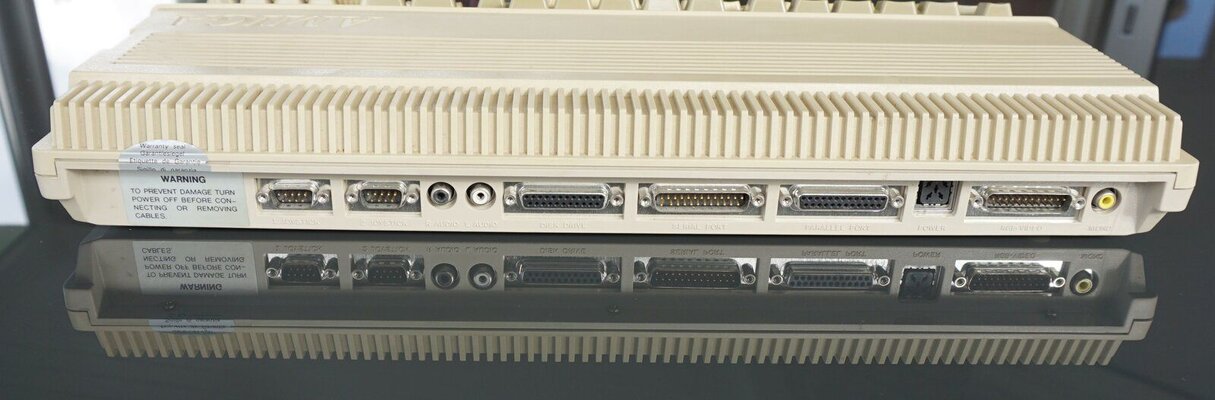
تمام پورتها را بررسی کنید: پورتهای جویاستیک، پورت ماوس، پورت سریال، پورت موازی، پورت فلاپی و پورتهای ویدئو. پینهای خم شده یا شکسته میتوانند دستگاه را غیرقابل استفاده کنند. پورت RGB مخصوصاً مهم است چون برای اتصال به نمایشگرهای مدرن نیاز خواهید داشت.
قیمتگذاری منصفانه
قیمت آمیگا ۵۰۰ دست دوم بسته به وضعیت، لوازم جانبی و نادر بودن قطعات متفاوت است. یک دستگاه کامل با جعبه اصلی، دفترچه راهنما و لوازم جانبی ارزش بیشتری دارد. دستگاههایی که تعمیر شدهاند و خازنهایشان عوض شده، معمولاً قابل اعتمادتر هستند.
قبل از خرید، قیمتهای بازار را بررسی کنید. دستگاههای ارزانتر ممکن است مشکلات پنهان داشته باشند که هزینه تعمیرشان از پسانداز اولیه بیشتر شود. گاهی بهتر است کمی بیشتر بپردازید اما دستگاهی سالم و قابل اعتماد بخرید.
نکات نهایی
همیشه از فروشنده بخواهید دستگاه را روشن کند و یک تست سریع انجام دهد. اگر از راه دور خرید میکنید، درخواست عکسهای دقیق از مادربورد و تست بوت کنید. اطمینان حاصل کنید که منبع تغذیه مناسب و سالم همراه دستگاه است.
به یاد داشته باشید که آمیگا ۵۰۰ یک کامپیوتر نزدیک به ۴۰ ساله است. حتی بهترین دستگاهها هم نیاز به مراقبت و گاهی تعمیر دارند. اما با خرید هوشمندانه، میتوانید سالها از این کامپیوتر افسانهای لذت ببرید.
#آمیگا #آمیگا۵۰۰ #خرید_آمیگا #آمیگا_دست_دوم #راهنمای_خرید #بررسی_آمیگا #خازن_آمیگا #مادربورد_آمیگا #رتروکامپیوتر #کامپیوترهای_قدیمی #سختافزار_کلاسیک #نوستالژی #کمودور #قیمت_آمیگا #تست_بوت #فلاپی_درایو #پورت_RGB #تعمیر_آمیگا #قطعات_آمیگا #کامپیوترهای_ایران
Buying a Used Amiga 500; Complete Guide and Important Tips
Buying a used Amiga 500 can be the beginning of a wonderful nostalgic adventure. But before paying, you need to know exactly what to look for. This guide will help you make an informed purchase and avoid costly mistakes.
Visual Inspection; The First Step
When you see the machine, first examine the case. Plastic yellowing in Amiga 500s is natural and almost all units have experienced it after nearly 40 years. But deep cracks, broken corners, and impact marks are bad signs. Test the keyboard — all keys should press smoothly and evenly. Sticky keys or those requiring excessive force indicate wear.
Motherboard and Capacitor Inspection
The most important part of inspection is opening the machine and examining the motherboard. Look at the electrolytic capacitors — if they show bulging, leakage, or discoloration, the machine needs immediate repair. Check the real-time clock battery; if the original battery is still in place and has leaked, serious damage may have occurred.
Motherboard cleanliness is also important. Excessive dust, moisture traces, or rust on connections indicate poor storage. Check chip sockets — oxidized sockets can cause intermittent and hard-to-find problems.
Boot and Display Test
If the seller allows, power on the machine. A healthy Amiga 500 should display the boot screen with its characteristic colors. Look for graphics errors, strange colors, or a black screen. The boot sound (floppy drive click) should also be heard.
If you have a floppy drive, test a disk. The drive should read the disk without unusual noises. Grinding or clicking sounds can indicate head or mechanism failure.
Ports and Connections
Check all ports: joystick ports, mouse port, serial port, parallel port, floppy port, and video ports. Bent or broken pins can render the machine unusable. The RGB port is especially important as you'll need it for connecting to modern displays.
Fair Pricing
The price of a used Amiga 500 varies depending on condition, accessories, and rarity of components. A complete machine with original box, manual, and accessories is more valuable. Machines that have been serviced with new capacitors are usually more reliable.
Before buying, research market prices. Cheaper machines may have hidden problems whose repair costs exceed the initial savings. Sometimes it's better to pay a bit more for a healthy, reliable machine.
Final Tips
Always ask the seller to power on the machine and perform a quick test. If buying remotely, request detailed photos of the motherboard and boot test. Ensure a suitable, healthy power supply is included.
Remember that the Amiga 500 is a nearly 40-year-old computer. Even the best machines need care and sometimes repair. But with smart buying, you can enjoy this legendary computer for years.
#Amiga #Amiga500 #BuyingAmiga #UsedAmiga #BuyingGuide #AmigaInspection #AmigaCapacitors #AmigaMotherboard #RetroComputing #VintageComputing #ClassicHardware #Nostalgia #Commodore #AmigaPrice #BootTest #FloppyDrive #RGBport #AmigaRepair #AmigaParts #IranianComputers